Digital inbox for businesses

Automatically capture, sort and distribute incoming documents

Caya’s digital inbox brings all your documents together in one central place, whether they arrive by post, email or upload. Every document is classified and routed directly to the right people, departments or systems.

OMR Reviews Top 100 Rated Tools in DACH 2026Caya ist OMR Leader für Intelligent Document Processing

Over 20,000 users automate their document processes with Caya

4.8 out of 5 star rating on G2
Icon of a green tick
ISO 27001 certified
Icon of a green tick
GDPR
DORA
GoBD
-compliant
Cloud servers in Germany

Digitise your post, end the paper chaos

Without Caya

No central point of entry
Postal mail sits in the post room, while email attachments are scattered across various mailboxes.
Manual opening and scanning
Letters have to be opened, digitised and filed individually.
Time-consuming distribution
Documents have to be distributed internally and often reach the relevant people with a delay.

Digital inbox with Caya

Icon of a green tick
All documents are available centrally
Regardless of their source, they are centralised in Caya, archived in a tamper-proof manner and accessible from any location.
Icon of a green tick
Opening and scanning by Caya
You don't need your own scanning infrastructure. All letters are opened and digitised in our scanning centres.
Icon of a green tick
Automatic distribution
Following your rules, every document immediately reaches the responsible person, the right department, or goes directly into your system.

Digital inbox: the four-step process

Every document ends up exactly where it belongs

Icon with lorry

Receipt

Your postal mail reaches us via mail redirection, a Caya postbox address, or local collection, and is digitised in our scanning centres in Germany. Caya automatically retrieves email attachments from your mailboxes, and you can upload other files yourself.

Classification

Caya automatically recognises the type of document it is. It doesn't matter how the document arrived.

Extraction

With Document Extractions, relevant data is read from your documents, such as invoice numbers, amounts, or IBANs.

Distribution

Document Automations routes every document according to if-then rules you define: to a person, a department, a folder, or directly into your connected system along with the extracted data.

Icon with lorry

Receipt

Your postal mail reaches us via mail redirection, a Caya postbox address, or local collection, and is digitised in our scanning centres in Germany. Caya automatically retrieves email attachments from your mailboxes, and you can upload other files yourself.

Classification

Caya uses text recognition (OCR) and AI to automatically identify the type of document, such as an invoice, contract, or official letter. It makes no difference how the document was received.

Extraction

With Document Extractions, relevant data is read from your documents, such as invoice numbers, amounts, or IBANs.

Distribution

Document Automations forwards every document according to if-then rules you have defined: to a person, a department, a folder, or directly into your connected system, complete with extracted data.

Security and Compliance

Secure from receipt to digital filing

With Caya, your digital inbox is secured according to defined safety and compliance standards. This ensures your documents remain protected at all times.

GDPR compliant

We adhere to current EU regulations. Personal data is properly collected, stored and documented.

ISO 27001 certified

Caya is certified according to the internationally recognised standard for information security management systems.

DORA compliant

Caya meets the requirements of the Digital Operational Resilience Act.

GoBD-compliant

Your digitised documents are stored in accordance with GoBD requirements and are traceable at all times.

Cloud servers in Germany

Your data is stored in an audit-proof manner in an ISO-certified data centre in Frankfurt.

GDPR compliant badge

GDPR compliant

We adhere to current EU regulations. Personal data is properly collected, stored and documented.

Caya is ISO 27001 certified – Information Security Management

ISO 27001 certified

Caya is certified according to the internationally recognised standard for information security management systems.

Caya meets the requirements of the EU DORA regulation for digital operational resilience

DORA compliant

Caya meets the requirements of the Digital Operational Resilience Act.

GoBD-compliant

Your digitised documents are stored in accordance with GoBD requirements and are traceable at all times.

Cloud servers in Germany

Your data is stored in an audit-proof manner in an ISO-certified data centre in Frankfurt.

Graphic featuring the Caya logo surrounded by the logos of SAP, Microsoft, Google, W and AWS

A digital inbox that connects with your tools

Want to know if Caya is compatible with your existing setup? Contact us for a consultation.

aws logo
Google Logo
Microsoft Logo

Features of your digital mailroom

Full-text search

We scan every letter using optical character recognition (OCR). This allows you to find any document in seconds thanks to full-text search.

Folders and tags

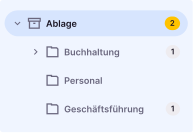
Organise your documents clearly in folders and add your own tags to suit your team's workflow.
UI folder structure in the Caya inbox
Letter with a date stamped on it

Proof of receipt

Every letter received via Caya is date-stamped upon arrival.

Permissions management

You decide who can view and edit which documents. You can set roles and permissions individually.
Graphic showing a document being shared with other users

Full-featured PDF editor

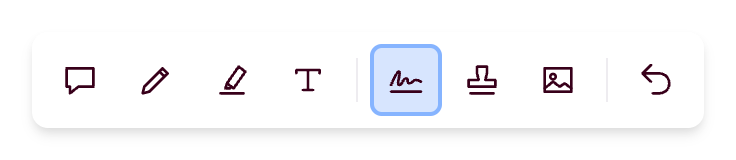
Use the integrated PDF editor to edit documents directly in Caya, fill out forms, add stamps, and sign digitally.

Frequently asked questions about the digital inbox

Can Caya also process emails and digital documents?

Yes. In addition to your postal mail, Caya automatically retrieves email attachments from your inboxes, and you can add documents via upload. Everything ends up in the same digital inbox and goes through the same classification and distribution process.

How do documents reach the right department?

Use Document Automations to set if-then rules that determine which document goes to which person, department, folder, or directly into which system.

How can we digitise our incoming mail with Caya?

Your post is sent to one of our scanning centres in Germany, where it is opened, scanned and then classified, ready for you in your digital inbox. Your email attachments and uploaded files are also stored there. Caya is a plug-and-play solution that is ready to use in no time, with no additional IT effort required.

Can multiple companies be managed under one Caya account?

Yes. Caya allows you to centrally manage multiple companies, subsidiaries or business units within a single account. Each company gets its own redirection order, a separate folder structure and individual access rights. Automated workflows assign incoming mail to the correct company folder – with no manual effort required.

Yes. Caya allows you to centrally manage multiple companies, subsidiaries or business units within a single account. Each company gets its own redirection order, a separate folder structure and individual access rights. Automated workflows assign incoming mail to the correct company folder – with no manual effort required.
Can all mail be digitised?

We always scan all incoming mail. To do this, we remove staples and paperclips where necessary. The only exceptions are documents that would be damaged by the scanning process; these are not scanned in full. In such cases, we only scan the first page using a tripod scanner. This includes, for example, notarised documents with seals.

We always scan all incoming mail. To do this, we remove staples and paperclips where necessary. The only exceptions are documents that would be damaged by the scanning process; these are not scanned in full. In such cases, we only scan the first page using a tripod scanner. This includes, for example, notarised documents with seals.
What happens to the original documents after scanning?

Original documents are initially stored free of charge in our short-term archive for 90 days. During this period, you can request documents at any time via express delivery. Upon request, we can also send you all documents in a consolidated shipment on a regular basis (monthly, fortnightly, weekly) or store them permanently in our long-term archive.

Original documents are initially stored free of charge in our short-term archive for 90 days. During this period, you can request documents at any time via express delivery. Upon request, we can also send you all documents in a consolidated shipment on a regular basis (monthly, fortnightly, weekly) or store them permanently in our long-term archive.
Which legal requirements does the digitisation process meet?

Documents are digitised and archived in an audit-proof manner using a highly standardised and automated process – compliant with GoBD, ISO 27001 certified, and GDPR compliant.

Documents are digitised and archived in an audit-proof manner using a highly standardised and automated process – compliant with GoBD, ISO 27001 certified, and GDPR compliant.

Have any questions?
Get in touch.

We are happy to answer all your questions and explain our product to you.

  • We take the time to understand your individual requirements and work with you to develop a solution.
  • Find out how you can increase productivity and optimise your workflows.
  • Get pricing information and discover various use cases for your business.
Question mark icon for tooltipQuestion mark icon for tooltip
Something went wrong while submitting the form. Please try again.
X icon

Thank you for your interest!

We will get back to you as soon as possible.